Most headlines called it a leadership reshuffle. Greg Brockman returns, teams get reorganized, Codex comes to mobile. Clean, tidy, forgettable.
But that framing misses the actual story.
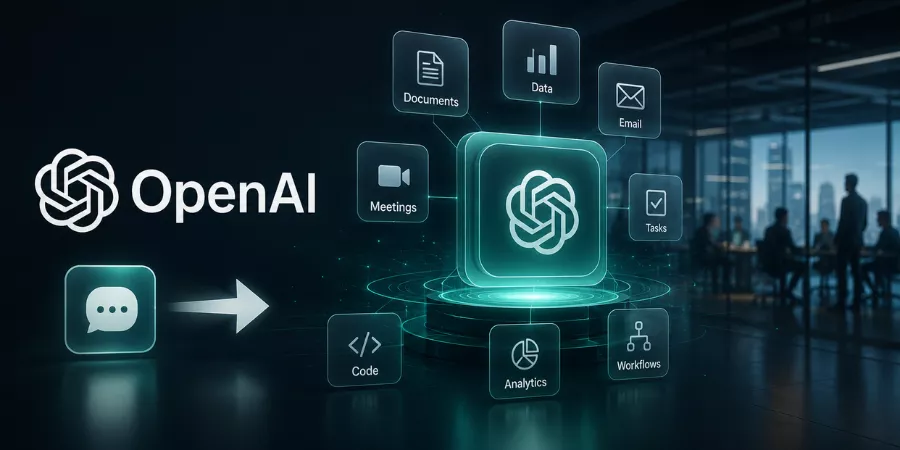
OpenAI just collapsed its three most important products, ChatGPT, Codex, and its API infrastructure, into a single unified system. That is not a product update. That is a platform shift. And if it works, it changes what “software” means for developers, businesses, and everyday users.
Here are 5 things you need to know right now:
- OpenAI unified ChatGPT, ChatGPT Codex, and API teams under one product strategy
- Greg Brockman is now leading that unified vision after returning from sabbatical.
- Codex mobile app access launched, letting developers supervise AI agents remotely.
- OpenAI is no longer competing in the “best chatbot” race, it is competing for the entire work stack.
- The real goal is one persistent AI workspace across coding, research, browsing, and enterprise tasks.
Who is ChatGPT Codex For?
ChatGPT Codex is built for anyone who writes, reviews, or ships code, but its real power shows up in a few specific use cases.
- Professional developers are the primary audience. If you spend hours on pull requests, bug fixes, large refactors, or moving between repositories, Codex handles the heavy lifting while you focus on architecture and decisions.
- Product managers building prototypes have found Codex especially useful. Because it works from a folder of files, interview notes, PRDs, specs, rather than a single chat prompt, PMs can use it to generate working prototypes without needing engineering support for every iteration.
- Engineering teams offloading repetitive work benefit from Codex’s ability to run tasks in parallel. Instead of one developer context-switching between five tickets, Codex can run five isolated tasks simultaneously and return clean diffs for review.
- Beginners and non-coders are a growing user base. If you can describe what you want in plain English, “create a script that converts Excel files to JSON” or “build a to-do app,” Codex will generate and iterate on the code, fix errors automatically, and produce something usable without requiring you to understand the underlying syntax.
How to Access ChatGPT Codex on the Web
You do not need to install anything to get started. The web version is the simplest way to try Codex for the first time.
Step 1: Log in to ChatGPT Go to chatgpt.com and sign in. Make sure your plan includes Codex. If you are on the free plan, you may have limited trial access.
Step 2: Open Codex from the sidebar Once you are logged in, look for Codex in the left-hand menu. Clicking it takes you to a separate Codex workspace. It looks and feels different from a regular ChatGPT chat.
Step 3: Set up two-factor authentication Codex requires this before you can do anything else. You will be asked to scan a QR code using an app like Google Authenticator. It only takes a minute and you only do it once.
Step 4: Connect your GitHub account Click “Connect to GitHub” and follow the prompts. You can give Codex access to all your repositories or only the ones you choose. Most people start with just one or two repos.
Step 5: Create your environment Pick the repository you want to work with and click “Create environment.” You may see a prompt about data settings, you can turn off model training here before moving on.
Step 6: Give Codex its first task You are ready. Type what you want done and click Code to have Codex make changes, or click Ask if you just want it to explain something about your codebase. You can watch it work in real time.
What Actually Changed at OpenAI?
Greg Brockman came back from sabbatical in early 2025 and stepped directly into one of the most consequential product roles in tech. He now oversees the unified direction of ChatGPT, OpenAI Codex, and the developer API, all under one product strategy.
Before this, these teams operated with significant separation. ChatGPT was consumer. Codex was developer. APIs were infrastructure. Each had its own roadmap, its own team culture, its own release rhythm.
What changed:
| Before | After |
| Separate ChatGPT product team | Unified product org under Brockman |
| Codex as standalone developer tool | Codex integrated into ChatGPT interface |
| API team working independently | API aligned with consumer + developer strategy |
| No mobile agent supervision | Codex mobile rollout live |
The ChatGPT Codex merger is not cosmetic. It signals that OpenAI wants one interface to rule all workflows, coding, research, automation, and beyond.
Why OpenAI is Combining ChatGPT, Codex, and APIs
Here is a real problem millions of knowledge workers face right now. You use ChatGPT for research. You use OpenAI Codex for coding tasks. You switch between tools, copy-paste outputs, lose context, and rebuild prompts from scratch every session. It is inefficient, and honestly, exhausting.
OpenAI clearly noticed this. Fragmented AI tools create fragmented productivity.
The ChatGPT Codex integration is OpenAI’s answer to that friction. Instead of three separate products doing three separate things, one persistent AI assistant handles:
- Coding and debugging via Codex
- Research and writing via ChatGPT
- Automation and enterprise tasks via API-connected agents
- Browsing and data retrieval through built-in tools
- Finance workflows – yes, including ChatGPT finance use cases through ChatGPT Plaid integration for personal and business data
This is what people mean when they say AI operating system. It is not a metaphor. It is a genuine architectural shift. ChatGPT becomes the interface layer. Codex becomes the execution engine. APIs become the connective tissue between everything.
As per 2024 McKinsey report, 72% of companies now use AI in at least one business function, up from 55% the year before. The demand for unified AI workflows is not speculative. It is already happening.
What is OpenAI Trying to Build?
This question is genuinely confusing for most people right now. You have ChatGPT, Codex, Operator, Atlas (reportedly in development), APIs, and agent frameworks all mentioned in the same breath. What actually connects them?
Think of it this way:
OpenAI’s emerging product stack:
| Layer | Product | What It Does |
| Interface | ChatGPT (mobile + desktop) | Where users interact |
| Execution | ChatGPT Codex | Runs code, builds, debugs autonomously |
| Infrastructure | OpenAI API | Connects everything to enterprise systems |
| Automation | OpenAI AI agents | Completes multi-step tasks without prompting |
| Data | Plaid + finance integrations | Real-world data access for personal + business use |
Codex is an AI assistant for coding, research, and productivity, that description used to mean a narrow developer tool. Now it describes something much closer to a full work environment.
This is the OpenAI super app strategy, even if OpenAI has not explicitly used that label. One app. One assistant. Every work context.
Codex on Mobile is More Important Than It Looks
The Codex mobile app launch got treated as a minor convenience update. Developers can now use Codex on their phones. Fine.
Except that is not really the point.
The real unlock is asynchronous agent supervision. When Codex for work runs an autonomous coding task, reviewing a codebase, writing tests, fixing a bug, it does not need you sitting at a laptop. The agent keeps working. You check progress, approve steps, and redirect when needed, all from your phone.
What this enables:
- Developers can kick off a build and supervise it during a commute
- Non-technical team leads can monitor AI coding agents without engineering context
- Remote and async teams can run AI workflows continuously without downtime
ChatGPT Codex usage patterns will shift because of this. The ChatGPT Codex usage limits and ChatGPT Codex plan structures will likely evolve to reflect usage that spans hours, not minutes, as agents complete longer tasks in the background.
For enterprise teams, this is significant. A 2024 GitHub survey found 92% of US developers already use AI coding tools at work. The question is no longer whether developers use AI. The question is whose ecosystem they live inside.
OpenAI’s Real Competition is No Longer Chatbots
The race OpenAI is running today looks very different from 2023.
ChatGPT Codex vs Claude Code is one comparison people search for, and it is a real one. Anthropic’s Claude Code is fast, accurate, and deeply integrated with developer environments. It is a serious tool.
But the competition OpenAI cares most about is broader:
| Competitor | Strength | Gap vs OpenAI |
| Claude Code (Anthropic) | Strong code understanding, context | No unified consumer + dev platform |
| Gemini (Google) | Deep search integration | Fragmented across Google products |
| Cursor | Developer-first IDE experience | Narrow use case, no consumer layer |
| GitHub Copilot (Microsoft) | Enterprise distribution | Locked inside IDE, not a full workflow |
| Devin (Cognition) | Autonomous engineering agent | No consumer reach |
| Perplexity | Research and search | Limited coding and automation layer |
None of them have what OpenAI is building: a single product that covers the AI coding agent layer, the research layer, the automation layer, and the consumer layer simultaneously.
That is the actual OpenAI enterprise AI strategy. Win the workflow, not just the model benchmark.
How Will ChatGPT Codex Affect Developers and Business Workflows?
Practical implications are already visible, and they will accelerate.
For developers:
- Coding is shifting from writing to supervising. You direct agents, review outputs, approve changes.
- AI coding agents handle repetitive build tasks; developers focus on architecture and decisions.
- The ChatGPT Codex download and mobile access makes this supervision possible anywhere.
- ChatGPT Codex pricing will matter more as usage moves from single queries to long-running tasks, current ChatGPT Codex price sits within the ChatGPT Plus and Pro tiers, with Pro unlocking higher ChatGPT Codex usage capacity.
For businesses:
- Fewer standalone SaaS subscriptions as one AI platform absorbs multiple tool categories.
- OpenAI API integration costs become more predictable inside a unified billing model.
- Enterprise procurement shifts from “which AI tool for which team” to “which AI platform for all teams.”
- A 2025 Salesforce report said that 83% of sales teams using AI saw measurable productivity wins, and then the unified AI platform thing seems to push it even faster. like really more unified, kind of.
For students and independent users:
ChatGPT Codex student access through Plus plans makes professional-grade coding assistance available without enterprise budgets. A student building a portfolio, learning full-stack development, or working on a capstone project can use the same agent workflows that enterprise teams use.
If ChatGPT Becomes the Interface for Everything, What Happens to Other Software?
If ChatGPT becomes the interface for coding, writing, research, meetings, documents, and automation, what happens to the software categories built around those individual tasks?
Project management tools. Code editors. Research platforms. Writing assistants. Spreadsheet plugins.
Each of them exists because there was no single tool that handled everything intelligently. OpenAI is quietly removing that reason for existing.
This is not a prediction. The OpenAI restructuring and the ChatGPT Codex merger are already steps in that direction. The timeline is unclear. The direction is not.
Greg Brockman OpenAI‘s unified product vision is the clearest signal yet that OpenAI sees itself as infrastructure, not just an app. The same way Windows became the operating system that made standalone DOS programs unnecessary, OpenAI wants ChatGPT to become the layer everything else runs on.
Whether that happens depends on execution, regulation, and competition. But the intent is visible now. And that is the story most coverage missed entirely.
Practical Use Cases for ChatGPT Codex
- Fixing a bug: Describe the problem in plain language. “The app crashes when a user tries to log out while a file is still uploading.” Codex reads the relevant files, finds the issue, writes the fix, and shows you exactly what it changed and why. You review it and decide whether to accept it.
- Creating a pull request: Once Codex finishes a task, it can package its changes and propose them as a pull request directly on GitHub. What normally takes several steps, write the fix, test it, write a description, open the PR, happens in one go.
- Automating a repetitive task: One real example: a user had a data processing job that took two hours every day. They described it to Codex, Codex wrote a script, and now the same job finishes in five minutes. That kind of time saving adds up fast.
- Speeding up code reviews: Cisco started using Codex to review complex pull requests and cut their review time by up to 50%. Instead of a developer spending an hour reading through a large change, Codex reads it, flags the issues, and summarises what matters.
- Building something from scratch without coding experience: You can say “Build me a simple budget tracker in HTML and JavaScript with a chart showing monthly spending” and Codex will build it. It handles errors on its own, iterates, and gives you a finished product. You do not need to understand a single line of the code it writes.
Tips to Get Better Results from ChatGPT Codex
- Keep your prompts short and clear: Codex does better with focused instructions than long ones. Instead of writing a paragraph describing everything you want, pick one thing and say it simply. “Add error handling to the payment function” will get you a better result than a five-sentence prompt trying to cover three different features at once.
- Always use a Git repo: This is the single most important setup step. Git gives you the ability to see what Codex changed, compare it to the original, and undo it if you do not like it. Working without Git means working without a safety net.
- Create an AGENTS.md file: This is a plain text file you drop in the root of your project. Use it to explain your tech stack, your coding style, and any rules Codex should follow. Something like “We use TypeScript. All functions should have error handling. Do not install new packages without asking.” Once this file is in place, you do not have to repeat that context in every prompt.
- Connect your tools using MCP: MCP connections let Codex reach outside your local files and talk to the tools your team already uses. Connect GitHub so Codex can read and create issues. Connect Slack or Linear so it knows what your team is working on. Once those connections are live, Codex can pull in real context from your actual workflow instead of working from prompts alone.
- Check the diff before you accept anything: Codex is capable, but it is not perfect. Every completed task comes with a diff, a clear before-and-after view of every change it made. Read it. Codex also logs every command it ran, so if something looks wrong, you can trace exactly what happened. Think of it the same way you would think of reviewing a colleague’s work before it goes live.
Quick Summary
| Topic | Key Point |
| OpenAI restructuring | ChatGPT, Codex, API teams unified under Greg Brockman |
| Codex on mobile | Enables async agent supervision from anywhere |
| Real competition | Claude Code, Copilot, Gemini – but OpenAI targets full workflow stack |
| Business impact | Fewer SaaS tools, more AI platform consolidation |
| Long-term direction | AI operating system replacing fragmented software categories |